Run Docker container
Login to DockerHub
To access our private DockerHub registry and Live Transcoder docker images, you must log in with your distinctive DockerHub access token.
Get the access token
You need to get your personal access token from the Customer Dashboard. It looks similar to this: dckr_pat_XXXXXXXXXXXXXXXXXXXXXXXXXXXXXXXX. Older tokens can look like this xxxxxxxx-xxxx-xxxx-xxxx-xxxxxxxxxxxx.

Login from host
On your host instance, run:
docker login --username comprimato
The username is comprimato. Once prompted, enter the DockerHub access token.
Get the docker-compose.yml
docker-compose.yml file contains instructions for Docker on how to run the Live Transcoder container. It also contains your license key so each license has its separate docker-compose.yml! You can download it from the Customer Dashboard.
On the Customer Dashboard, there is a WGET button that generates the wget terminal command that can download the docker-compose.yml to your host instance. Click on it to copy the command to the clipboard. If you can't see the button, please, scroll right while hovering above your license row; it's in the rightmost column.

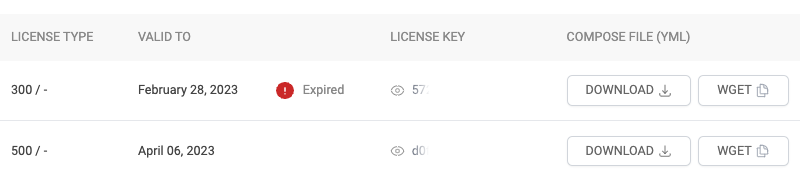
Your wget command will look similar to this.
wget -O docker-compose.yml https://link-generated-for-you
Run it on the host instance to download your docker-compose.yml.
Alternatively, you can download it to your computer by clicking on the DOWNLOAD button and upload it to your host instance manually, e.g., using the scp command:
scp -i path/to/your-private-key.pem path/to/docker-compose.yml ec2-user@IP_ADDRESS:
Optional: Alternative Way to Get the Docker Compose Template
To ensure there is no version mismatch in docker-compose.yml, you can extract the template directly from the Docker image metadata. Comprimato embeds the docker-compose information within a special image label in base64 format.
To retrieve it, run the following command:
docker inspect <image>:<tag> | jq -r ".[].Config.Labels.\"com.comprimato.docker.compose\"" | base64 -d
Important Notes: After obtaining the docker-compose.yml template, be sure to update the following values before use:
- Image with tag value – Ensure that the image field in the
docker-compose.ymlfile reflects the correct<image>:<tag>you want to deploy. - TRC_LICENSE_KEY value – Set/copy your valid license key in the environment variables section of the
docker-compose.ymlfile.
This method ensures that your docker-compose.yml is always aligned with the image version and properly configured for deployment.
Run the container!
Run the following command in the same directory as the docker-compose.yml file is located:
docker-compose up -d

Check that the Live Transcoder Docker container is running by a command:
docker ps
It should print output similar to this:
CONTAINER ID   IMAGE                               COMMAND        CREATED             STATUS         PORTS     NAMES
5c657d985670   comprimato/live-transcoder:latest   "/sbin/init"   About an hour ago   Up 6 seconds             transcoder0