Introduction
This document supplies basic information on how to operate the Comprimato Twenty-One Encoder Appliance. Inside the document, you will find information about installation, operation, and troubleshooting.
Within the packaging a Quick Start Guide is available. This contains setup instructions, credentials for UI, SSH and IPMI and also the serial number of the appliance.
If this is missing please contact support@comprimato.com and an electronic copy can be sent to you.
- Rack Mount the Encoder
- Secure the encoder in your server rack using the provided rack rails. Ensure it is properly aligned and fastened.
- Connect Power and Networking Cables
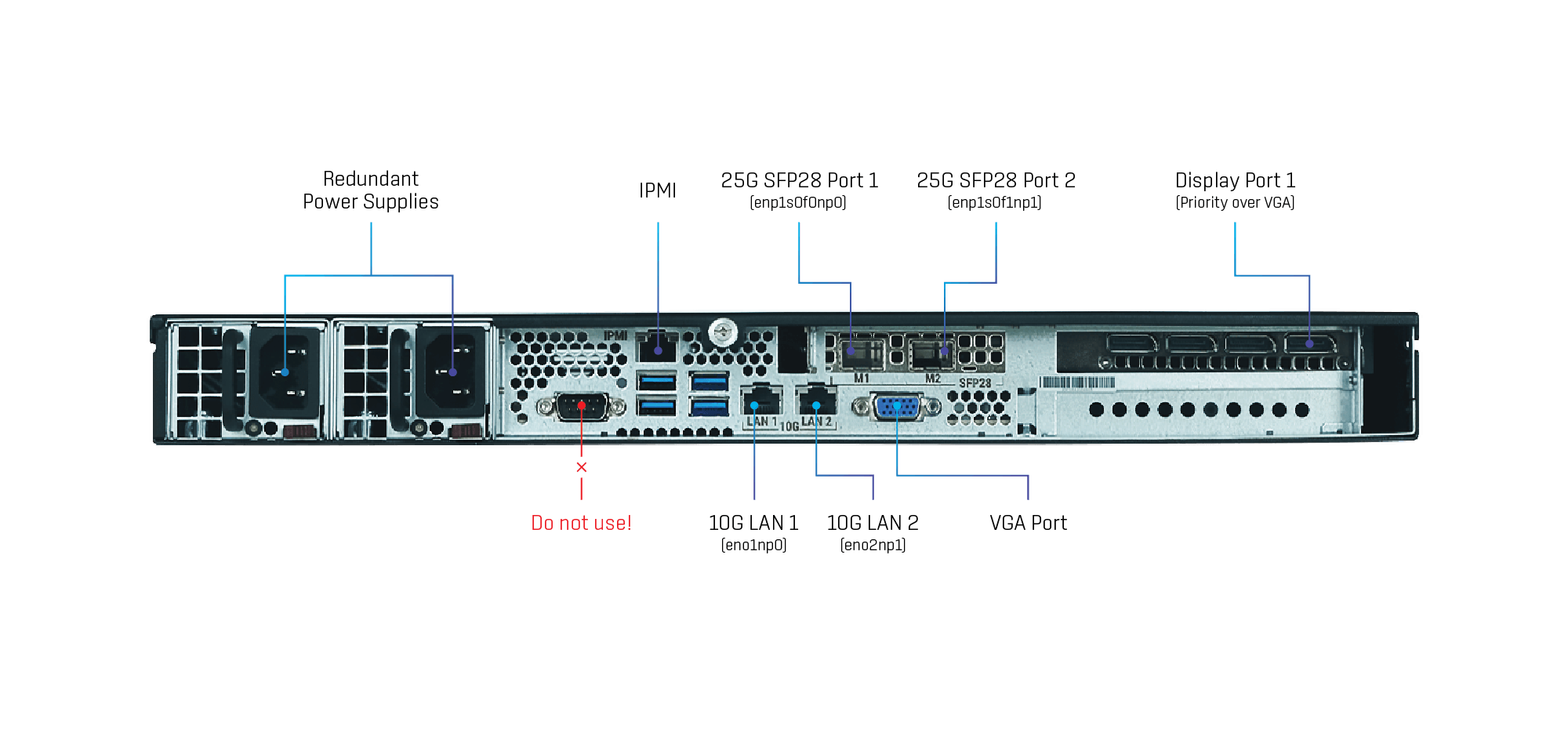
- Plug in the dual power cables for redundancy.
- Connect the RJ-45 10GbE cables for network connectivity and non-2110 traffic.
- Insert the SFP28 modules and the appropriate cables.
- Optionally, connect a USB keyboard, mouse, and monitor via DisplayPort #1 or VGA (explained in Chapter 1.5 Display connection) for local access.
- Power On the Appliance
- Press the power button to start the appliance. Wait for it to boot.
- Access the Graphical User Interface (GUI) through one of the following methods:
- Directly on the monitor connected via DisplayPort #1 or VGA.
- Through the network on dynamically assigned IP address if connected to LAN Port 1 (check your network’s DHCP server to find the IP).
- Through the network on the pre-configured static IP address 192.168.1.42 if connected to LAN Port 2.
- Login and Accept the EULA
- Log in using the credentials provided down below.
- Read and accept the End User License Agreement (EULA) to proceed.
- Initial Setup Dialogue
- The Setup Dialogue will start automatically. Follow the prompts.
- Enter the hostname for your appliance.
- Configure the network ports and assign IP addresses.
- Ensure that at least one of the 10GbE network interfaces is configured for administration and management purposes.
- Verify the settings to avoid any IP address conflicts within your network.
- Finalize and Save Settings
- Save your configuration.
- Verify PTP configuration
- SMPTE 2110 requires PTP (network time synchronization) to work correctly.
- Go to "Setup / PTP configuration" to check that the PTP configuration matches your network PTP setup (PTP domain, …).
- PTP only works over SFP28 modules.
- An orange warning bar will appear if PTP isn't set correctly (e.g., GM wasn't found).
- Congratulations
- Your Twenty-One Encoder is now ready for usage, and you can proceed to stream setup.
- Refer to the user manual for advanced setup options or troubleshooting if needed.